Vibe Coding for Tech Recruiters: 5 Tools You Can Build Today

Sourcing Candidates
  • July 23rd, 2026
  • 12 min read

Summary

Already have an account? Log in.

If you spend any time on LinkedIn right now, you’ve seen the posts: someone built a tool over the weekend that’s going to replace an entire function. A new ATS. A sourcing engine that allegedly does the work of 10 recruiters. The screenshot looks slick, the claim is enormous, and almost none of it is used by anyone the next morning.

I want to make the opposite case. Vibe coding is genuinely useful for recruiters, but its value has nothing to do with replacing your stack. It’s about closing the gap between “I wish I had a tool for this” and actually having one, in an afternoon, for free. The recruiters who get real mileage out of it aren’t building empires. They’re building a handful of boring things everyone on the team opens daily.

Here’s what’s worth building, what to leave alone, and a structured way to think about each app before you write a single prompt, including two built specifically for the tech-recruiting problem.
What You Actually Need to Get Started

You don’t need to learn to code, and you don’t need a budget. The entry cost here is close to zero, which is part of why the noise is so loud. A practical starter kit:

A vibe-coding platform. This is the engine: you describe what you want in plain English and it builds a working app. Lovable, Bolt and v0 by Vercel are the most recruiter-friendly; Replit and Claude Artifacts work too. Most have a free tier that resets daily, so you can build and iterate without spending anything.

A planning habit, not a tool. Before you build, write a short PRD, a one-page “product requirements document” describing what the tool does, who uses it, and what “done” looks like. You can draft it in ChatGPT or Claude in five minutes. This single step separates tools that work from tools you abandon (more on that at the end).

A way to capture inputs cheaply. Most of these apps run on text you already produce: kickoff notes, role requirements, interview feedback. A meeting-notes tool like Granola or Bluedot turns your calls into clean text you can paste straight in.

A browser glossary for the tech ones. If you recruit for engineering roles, a tool like GlossaryTech, backed by Dice, that defines technical terms in context as you browse is the companion layer two of the apps below build on, more on that shortly.

Optional, once you’re hooked: connectors (many platforms link to your ATS or Google Sheets) and a place to keep your PRDs so you can remix and improve builds over time. Start without these. Add them when a real need shows up, not before.

That’s it. A platform, a plan, a way to feed it text. Everything below is built on that.

Start With the Pain, Not the Tool

Ask one question before you build anything: which pain point am I actually solving? It sounds obvious, but when building gets this easy, the temptation is to build because you can, and the result is a dozen half-used apps nobody opens twice. The test: if a tool doesn’t move you from point A to point B, it’s noise. Most “look what I built” posts fail it.

So map your own process and find the friction. Not the dramatic problems, the small recurring ones. The thing you redo every Monday. The handoff that always gets garbled. The document you keep rebuilding from scratch. The bar isn’t “impressive,” it’s “used.”

The Build vs. Buy Line: Memorize This

Before anything else, internalize the one rule that keeps you out of trouble:

If the tool needs sensitive candidate data, buy it, don’t build it. If the data is only yours, with no candidate or partner information in it, build it.

That’s the whole line. Candidate PII (Personally Identifiable Information), profiles, application records, anything covered by your data agreements, all of it belongs in tools built to secure it: your ATS, your compliant vendors. You do not vibe code a place to store candidate data. Full stop. That’s where enthusiasm turns into legal exposure.

But the internal scaffolding, the things that hold your process and your judgment and no one’s personal information, is wide open. That’s where every good build lives, and it’s why each of the five apps below is safe to make.

App #1: A Stack Mapper (Built for Tech Recruiters)

  • Audience: Tech recruiters and sourcers who screen roles they don’t fully understand.
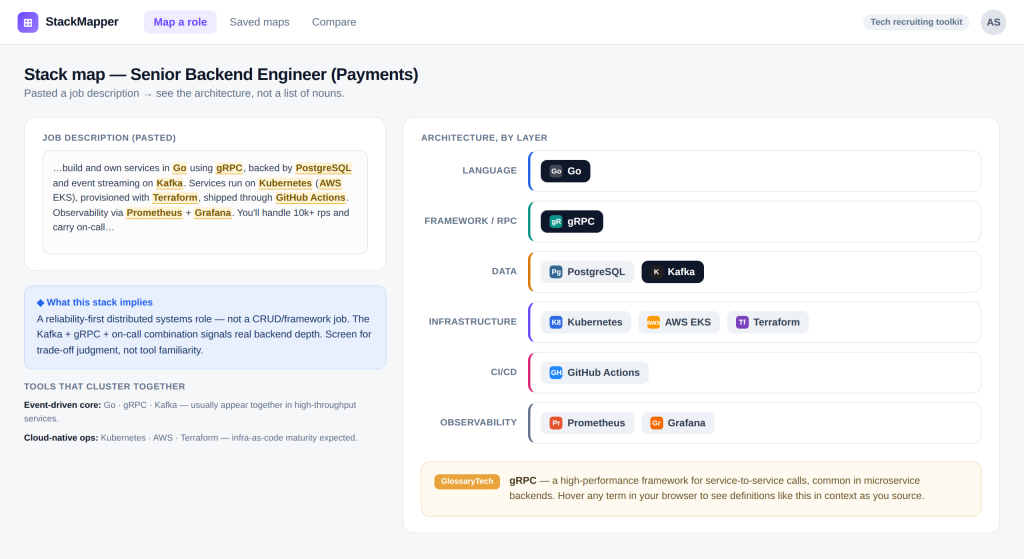
  • Goal: Turn a job description or a list of skills into a visual map of the stack (language, framework, database, infrastructure, CI/CD) so you can see how the pieces relate instead of reading a flat list of nouns.
  • How hard: Medium. The logic is a prompt; the value is in the layout.
  • Data risk: None. Paste a public JD or a skills list, no candidate identity required.
  • Time to first version: An afternoon for a usable v1.

This one’s genuinely specific to our world. Most tech recruiters memorize definitions (REST, Docker, Kafka, Kubernetes), and that has a hard ceiling, because technology never sits in isolation. A backend engineer isn’t “a Go developer.” They’re writing logic in a language, using a framework, connected to a database, deployed on infrastructure, shipping through a pipeline. Each piece has a job; each connects to the others.

A stack mapper makes that visible: paste in the requirements, and it groups the technologies into layers and shows which tools cluster, so you can see what stack implies what kind of work. Once you can see the architecture, “Senior Go engineer on distributed systems deployed via Kubernetes” stops being a string of buzzwords and becomes a picture.

It pairs naturally with a browser glossary like GlossaryTech, powered by Dice. The glossary explains the individual terms in context as you source; the stack mapper is the layer above it, taking those same terms and showing how they fit as a system. One gives you the what, the other the where. That’s what moves a recruiter from keyword-matching to evaluating engineering work.

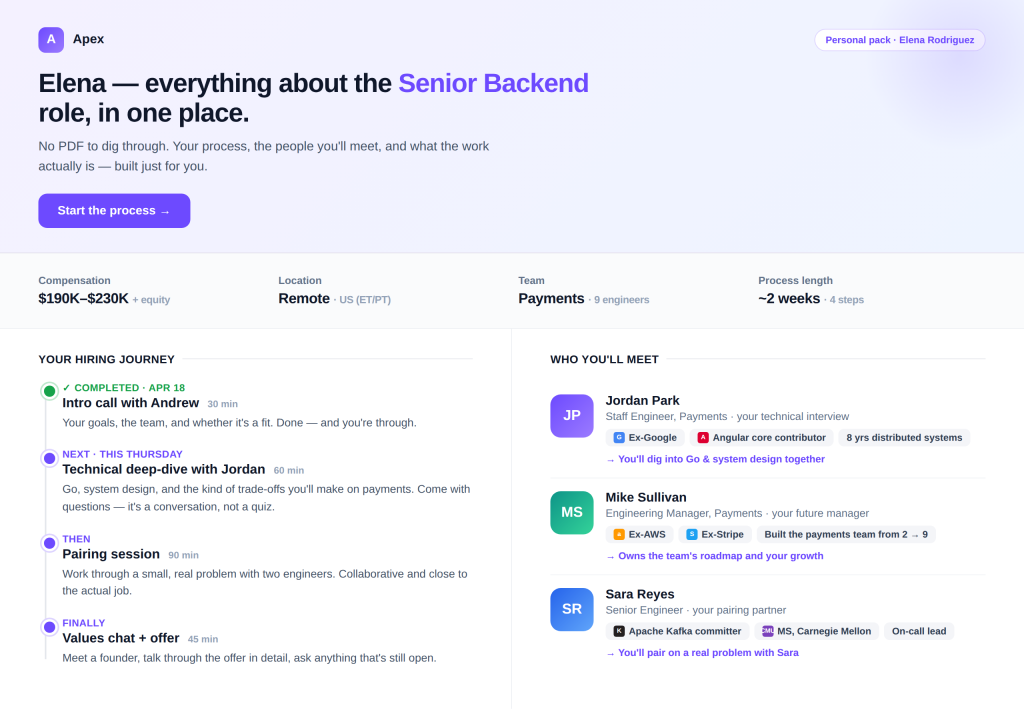
App #2: A Candidate Pack That Isn’t a Boring PDF

  • Audience: Candidates (at outreach, at offer, and at pre-onboarding).
  • Goal: Turn the dense documents you already send into something visual and interactive that people actually engage with, without changing a single fact.
  • How hard: Easy to medium, depending on how polished you want it.
  • Data risk: None. You’re packaging your information, not storing theirs.
  • Time to first version: An afternoon for a template you reuse per role.

This is about experience rather than efficiency. Think about what you currently send: an outreach message, a candidate pack that’s a wall-of-text PDF, a pre-onboarding doc buried in an email, all of it information the candidate has to slog through.

A standard job description is the worst version of this. It lists responsibilities and requirements and not much else, and it’s the same document everyone gets. A candidate pack lets you show the things a JD never does, the things that actually make someone want the role:

  • Who they’ll work with. Not a team size, the actual people. “You’ll pair with Sara, an Apache Kafka committer,” or “your manager built this team from two engineers to nine.” Real names, real backgrounds, ex-Google, contributed to Angular, the credibility that makes a strong candidate lean in.
  • The real impact. What does this person actually move? “You’ll own the service that processes every payment on the platform” lands very differently from “maintain backend systems.”
  • The technical challenges. The interesting problems, not the tech-stack checklist. Senior engineers choose roles based on what they’ll get to solve, so say it plainly.
  • A clear interview process with timelines. Exactly what happens, who they meet at each step, and how long the whole thing takes. Candidates ghost when they’re left guessing; certainty is a perk in itself.
  • Real perks, not ping-pong tables. The things that matter to adults: comp range, equity, remote setup, learning budget, parental leave. Be specific. Vague “great culture” claims read as filler.

You already have all of this raw material, it’s scattered across your notes, the hiring manager’s head, and your ATS. Vibe coding turns it into a single good-looking web page the candidate actually reads, built per role in an afternoon. In a market where candidate experience is one of the few real differentiators, a pack like this does more for your brand than another automation will, and with no candidate data in it, it’s low-risk and easy to reuse.

App #3: A Structured Debrief Flow

  • Audience: The full interview panel: recruiters, hiring managers, and the founder or exec who signs off.
  • Goal: Align everyone after the final round and reach a clean proceed/don’t-proceed decision in 15-20 minutes, without the loudest voice in the room setting the tone.
  • How hard: Easy. Almost trivially simple by design.
  • Data risk: None (if you build it right; see below).
  • Time to first version: An afternoon, then iterate with the team.

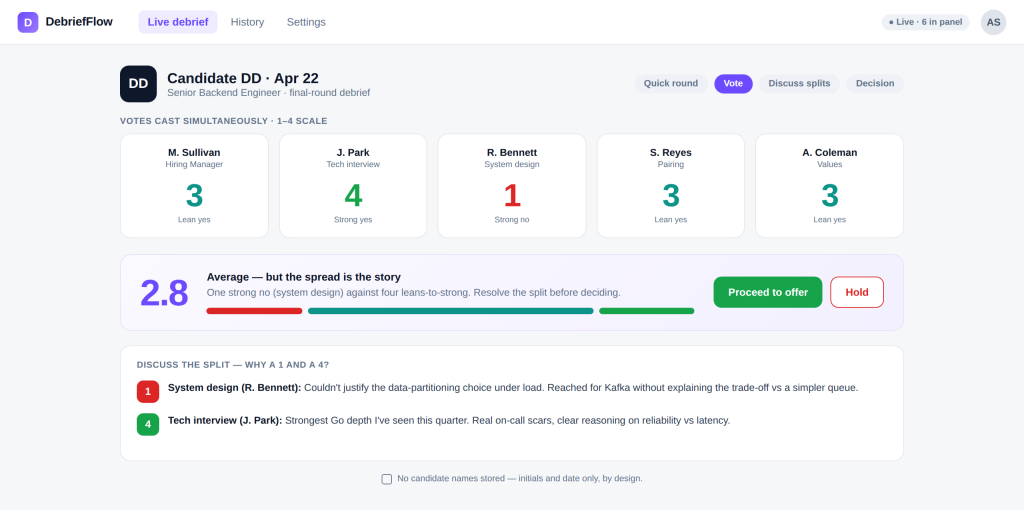
Each interviewer gives a 20-40 second take, flags get discussed, then everyone votes on the count of three, simultaneously, so nobody anchors to anyone else. You get an average, and the real conversation starts where the votes diverge: why did one person land on a one and another on a four? That gap is the signal.

Two non-negotiables. Don’t use candidate names; initials and a date only, so it physically can’t track individuals and stays on the safe side of the data line. And accept how unimpressive it is. This is “cover your eyes and raise your score” turned into software. The unglamorous tool opened in every debrief beats the brilliant one opened once.

Building it is a one-afternoon job. Ask your platform for a single-screen app with three states: a setup field for role title, initials, and date; a voting screen where each panelist picks one to four; and a results screen showing the votes, the average, and the spread. The one thing to be explicit about in your prompt: keep every vote hidden until all panelists have submitted, then reveal at once. That simultaneity is the whole point. Skip databases entirely, the tool shouldn’t save anything, which is also what keeps it safe on the data line. Then ship the rough version and let your panel tell you what’s annoying. The teams who get this right rarely nail it on the first try; it’s the rounds of “move this button” feedback that turn it into something everyone actually opens.

App #4: A Trade-Off Question Generator (Built for Tech Recruiters)

  • Audience: Tech recruiters preparing for screening calls.
  • Goal: Generate sharp, trade-off-based screening questions for a given stack and seniority level, so that you stop asking “do you have experience with X?” and start asking questions that reveal how someone actually thinks.
  • How hard: Easy. It’s mostly a well-designed prompt with a clean interface.
  • Data risk: None. Inputs are technologies and seniority, not candidates.
  • Time to first version: An afternoon.

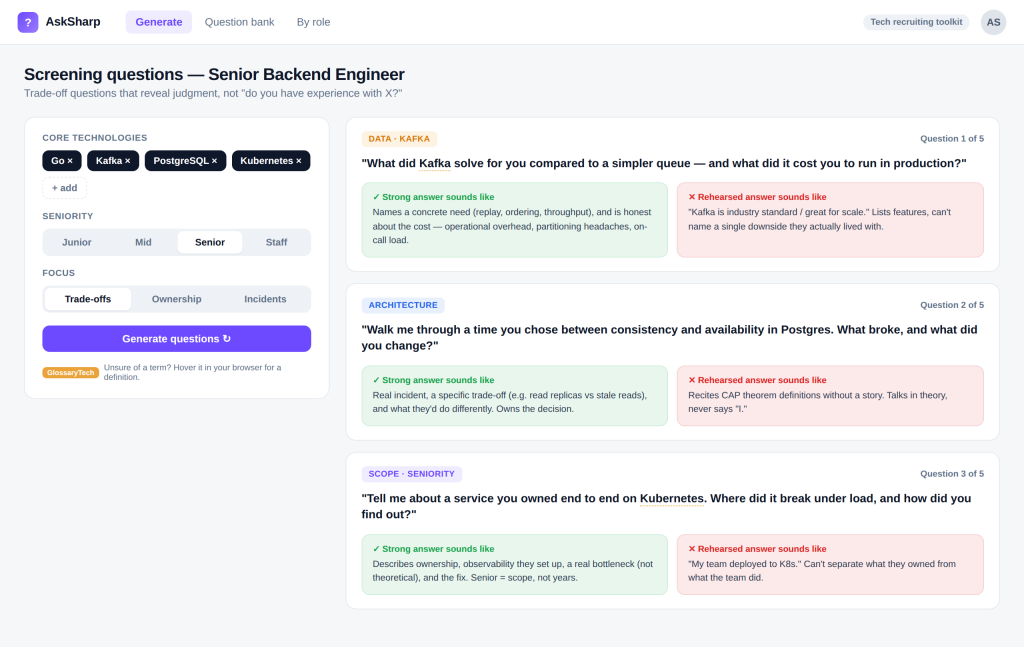
The biggest upgrade to a screening call isn’t more vocabulary, it’s better questions. “Do you have experience with microservices?” gets a yes and tells you nothing. “What did microservices solve for you versus your previous architecture, and what did they cost you?” tells you whether the candidate made the decision, lived with it, and understands the trade-offs.

This tool takes the role’s core technologies and target seniority and generates those trade-off questions (microservices vs. monolith, SQL vs. NoSQL, serverless vs. containers), plus what a strong answer sounds like versus a rehearsed one. It operationalizes evaluating seniority through scope and judgment, not years. Run it alongside a browser glossary and you’ve got a safety net: any term you’re unsure of is one hover from a definition, so you can ask a sharp question and still follow the answer.

This one is almost entirely a prompt. Ask your platform for a simple form: chips for the technologies, a seniority toggle (junior to staff) and a generate button. The real work is the instruction behind the button. Tell it to produce trade-off questions only, each comparing two real options for the chosen stack, and to return three things per question: the question, what a strong answer reveals, and what a rehearsed one sounds like.

Be explicit that it should never output “do you have experience with X” questions, that one rule shapes the whole output. Keep the questions on screen so you can read them straight off during the call. There’s no candidate data here, so no database needed; you can rebuild and tweak the prompt as often as you like. When the questions start feeling generic, sharpen the instruction, not the interface.

App #5: A Kickoff Generator

  • Audience: Recruiters and sourcers who run kickoff calls with hiring managers.
  • Goal: Walk into the kickoff already holding a structured draft (job-ad skeleton, ideal candidate profile, interview-panel briefs) instead of leaving with a vague wish list.
  • How hard: Easy. A great all-rounder, whether or not you recruit for tech.
  • Data risk: None. Contains role and process info, no candidate data.
  • Time to first version: An afternoon.

Here’s how to build it, step by step:

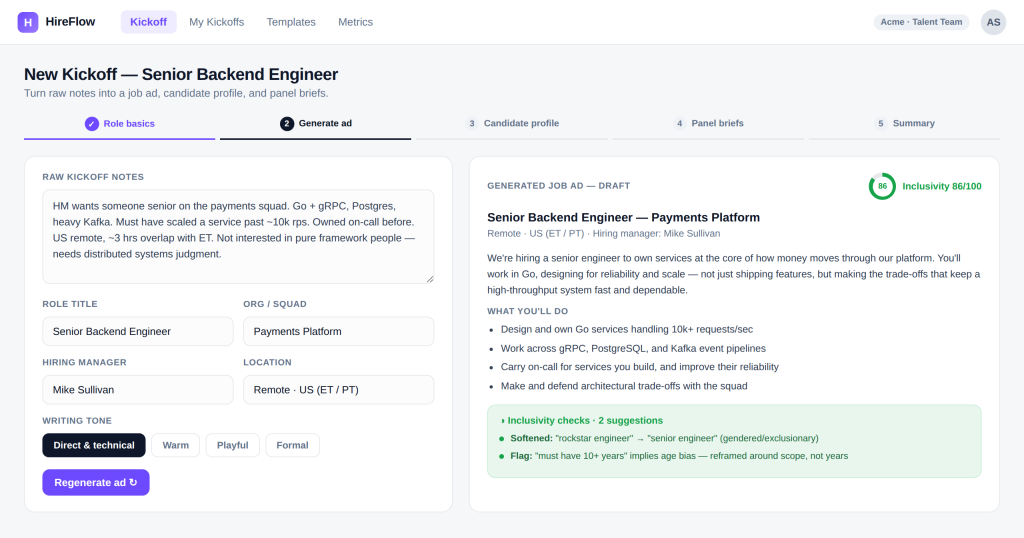
  1. Start with the inputs. Ask your platform for a form with four fields: a big text box for raw kickoff notes, plus role title, hiring manager, and a tone selector (direct, warm, formal). The notes box is the important one, everything else generates from what you paste there.
  2. Generate the job ad first. Behind the button, instruct it to turn the notes into a clean job-ad skeleton: a short intro, a “what you’ll do” list, and requirements. Tell it to write in the selected tone and to avoid corporate filler.
  3. Add an inclusivity pass. In the same prompt, have it flag and rewrite exclusionary language: gendered terms, age-coded phrases like “10+ years,” accessibility gaps, and anything that isn’t neurodivergent-friendly. Show the flags so the recruiter sees what changed and why.
  4. Generate the candidate profile. Add a second step that drafts an “ideal candidate” from the same notes, what good looks like, so the whole panel shares one definition of the bar.
  5. Generate the interviewer briefs. Finally, have it produce a short brief per interviewer: what that person should assess and what a strong signal looks like. This is what turns a kickoff into an aligned panel instead of five people improvising.
  6. Deliberately skip the send. Don’t connect it to email. Let it draft; you copy-paste yourself. Automate the preparation, not the sending, so a human always reviews before anything leaves your hands.

There’s a positioning win buried in this. I’d retire the word “intake” entirely; it makes recruiters sound like a kitchen taking orders. A kickoff tool flips it: you arrive with a draft and say, “Here’s how I understand the search, let’s fine-tune it.” It’s not about saving time. It’s about changing the position you negotiate from, which is why, tech or not, this is the one I’d point any recruiter to first.

What Separates a Toy from a Tool

A few habits decide whether your build gets adopted or abandoned:

Plan before you build. Use planning mode, or write a short PRD, a one-page product requirements document describing what you want and what “done” looks like, before you generate. The instinct is to jump in and build, build, build. The discipline is measure twice, cut once.

Ship rough, then iterate with real users. A tool is worth something the moment your team uses it, not the moment you finish it. Ship a draft, collect “move this button” feedback over a couple of weeks, then roll it out.

Stop chasing pretty. Impactful beats perfect. The point is the paper cut you solved, not the polish.

Don’t marry one tool. The best tool for a given task this month may not be next month. Treat your stack as something you revisit, not something you pledge loyalty to.

The Honest Bottom Line

Vibe coding is a real unlock. For the first time, you can build the small tool you’ve always wished existed without filing a ticket with engineering or waiting on a vendor roadmap.

But the recruiters doing this well aren’t the ones posting “I replaced an entire team” screenshots. They’re the ones who mapped their workflow, respected the data line, and built a few boring tools everyone actually uses (and, if they recruit for tech, a couple sharp enough to upgrade how they screen).

That’s the whole game. It’s not the shiniest thing in the world; it’s something that gets the job done and clears your paper cuts. Build that. Leave the candidate database to the people who built it to be secure. And the next time an “ATS killer” shows up on your feed, you’ll know which side of the line it’s standing on.


Andrew Stetsenko is an HR-tech entrepreneur with 15+ years of experience working in the tech industry. He advises tech recruiting and employer branding teams on global hiring strategies.

You may also like

View all posts
How Tech Recruiters Can Build Real Technical Fluency (Without Becoming Developers)

How Tech Recruiters Can Build Real Technical Fluency (Without Becoming Developers)

  • March 19th, 2026
  • 9 min read
Read now
How Dice Tools Help You Build an Automation Team

How Dice Tools Help You Build an Automation Team

  • March 18th, 2026
  • 4 min read
Read now
Podcast Overview: How AI Agents Are Reshaping the Recruiting Process

Podcast Overview: How AI Agents Are Reshaping the Recruiting Process

  • March 4th, 2026
  • 2 min read
Read now
View All Posts